vite.config.js文件如下
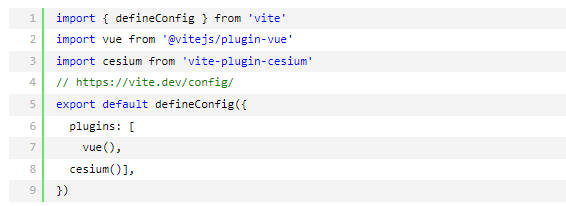
app.vue文件如下
<template>
<div id="app">
<div id="cesium-container"></div>
<div class="control-panel">
<div>
<label>经度: </label>
<input v-model="longitude" type="number" step="0.000001">
</div>
<div>
<label>纬度: </label>
<input v-model="latitude" type="number" step="0.000001">
</div>
<div>
<label>高度(米): </label>
<input v-model="height" type="number">
</div>
<div>
<label>偏航角(度): </label>
<input v-model="headingAngle" type="number">
</div>
<div>
<label>俯仰角(度): </label>
<input v-model="pitchAngle" type="number">
</div>
<button @click="flyTo">飞入</button>
</div>
</div>
</template>
<script>
import { onMounted, ref } from 'vue';
import * as Cesium from 'cesium';
export default {
setup() {
// 默认参数
const longitude = ref(108.94859);
const latitude = ref(34.18970);
const height = ref(230);
const headingAngle = ref(255.01);
const pitchAngle = ref(-77.64);
let viewer = null;
Cesium.Ion.defaultAccessToken ="WeyJhbGciOiJIUzI1NiIsInR5cCI6IkpXVCJ9.eyJqdGkiOiI1NDYwYTU4Ny01OGQzLTQ1YjItYmM0OS1lMTg0NzQ4Y2E5ZjQiLCJpZCI6NDQ4OTksImlhdCI6MTYxNDU3MDc5OX0.Wx5h51PEYxUM_ORJ6gGbyew1nhzTX2wEN01P7BU38cE";
// 初始化Cesium
const initCesium = async () => {
//知识重点////////////////
//创建 Cesium.Viewer 时没有指定 imageryProvider 和 terrainProvider,则Cesium 会自动使用默认的 Bing Maps 作为影像源(通过您提供的 Ion Token)
// 检查Cesium版本
console.log('Cesium版本:', Cesium.VERSION);
viewer = new Cesium.Viewer('cesium-container', {
// terrainProvider: new Cesium.EllipsoidTerrainProvider(), //EllipsoidTerrainProvider加载默认的地形。效果是有bing地图但是无起伏dem数据。
timeline: false,
animation: false,
baseLayerPicker: false,
sceneModePicker: false,
navigationHelpButton: false,
homeButton: false,
geocoder: false,
infoBox: false,
selectionIndicator: false
});
// // 添加基本影像图层(使用OpenStreetMap)
// viewer.imageryLayers.addImageryProvider(
// new Cesium.UrlTemplateImageryProvider({
// url: 'https://{s}.tile.openstreetmap.org/{z}/{x}/{y}.png',
// subdomains: ['a', 'b', 'c'],
// maximumLevel: 19
// })
// );
// 或者方法2:使用ArcGIS World Imagery(免费卫星影像)国内不能访问!!!
// viewer.imageryLayers.addImageryProvider(
// new Cesium.ArcGisMapServerImageryProvider({
// url: 'https://services.arcgisonline.com/ArcGIS/rest/services/World_Imagery/MapServer'
// })
// );
// // 高德地图影像
// const amapProvider = new Cesium.UrlTemplateImageryProvider({
// url: 'https://webst0{1-4}.is.autonavi.com/appmaptile?style=6&x={x}&y={y}&z={z}',
// subdomains: ['1', '2', '3', '4'],
// maximumLevel: 18
// });
//加载自定义地形服务
viewer.terrainProvider = Cesium.CesiumTerrainProvider.fromUrl(
'http://192.168.10.23:42225/service/bydzy2lf9bkl/terrain',
{
requestWaterMask: true,
}
);
//移除水印
viewer.cesiumWidget.creditContainer.style.display = "none";
// flyTo();
};
onMounted(initCesium);
const flyTo = () => {
if (viewer) {
const destination = Cesium.Cartesian3.fromDegrees(
parseFloat(longitude.value),
parseFloat(latitude.value),
parseFloat(height.value)
);
const heading = Cesium.Math.toRadians(parseFloat(headingAngle.value));
const pitch = Cesium.Math.toRadians(parseFloat(pitchAngle.value));
viewer.camera.flyTo({
destination,
orientation: {
heading,
pitch,
roll: 0.0
},
duration: 3 // 飞行时间(秒)
});
}
};
return {
longitude, latitude, height,
headingAngle, pitchAngle,flyTo
};
}
};
</script>
<style>
/* 样式保持不变 */
#app {
width: 100%;
height: 100vh;
margin: 0;
padding: 0;
background: rgba(42, 42, 42, 0.8);
}
#cesium-container {
position: absolute;
width: 100%;
height: 100vh;
margin: 0;
padding: 0;
overflow: hidden;
}
.control-panel {
position: absolute;
top: 10px;
left: 10px;
background: rgba(42, 42, 42, 0.8);
padding: 10px;
border-radius: 5px;
z-index: 999;
color: white;
}
.control-panel div {
margin-bottom: 8px;
}
.control-panel label {
display: inline-block;
width: 100px;
}
.control-panel input {
width: 80px;
}
.control-panel button {
margin-top: 10px;
padding: 5px 10px;
cursor: pointer;
}
</style>
下面是加载第三方底图并且加载自定义地形
<template>
<div id="app">
<div id="cesium-container"></div>
<div class="control-panel">
<div>
<label>经度: </label>
<input v-model="longitude" type="number" step="0.000001">
</div>
<div>
<label>纬度: </label>
<input v-model="latitude" type="number" step="0.000001">
</div>
<div>
<label>高度(米): </label>
<input v-model="height" type="number">
</div>
<div>
<label>偏航角(度): </label>
<input v-model="headingAngle" type="number">
</div>
<div>
<label>俯仰角(度): </label>
<input v-model="pitchAngle" type="number">
</div>
<button @click="flyTo">飞入</button>
</div>
</div>
</template>
<script>
import { onMounted, ref } from 'vue';
import * as Cesium from 'cesium';
export default {
setup() {
// 默认参数 (西安大雁塔附近坐标)
const longitude = ref(108.94859);
const latitude = ref(34.18970);
const height = ref(500); // 建议高度设置高一点,方便观察地形起伏
const headingAngle = ref(255.01);
const pitchAngle = ref(-77.64);
let viewer = null;
// 1. 配置 Cesium Token
Cesium.Ion.defaultAccessToken = "WeyJhbGciOiJIUzI1NiIsInR5cCI6IkpXVCJ9.eyJqdGkiOiI1NDYwYTU4Ny01OGQzLTQ1YjItYmM0OS1lMTg0NzQ4Y2E5ZjQiLCJpZCI6NDQ4OTksImlhdCI6MTYxNDU3MDc5OX0.Wx5h51PEYxUM_ORJ6gGbyew1nhzTX2wEN01P7BU38cE";
const initCesium = async () => {
console.log('Cesium版本:', Cesium.VERSION);
// 2. 创建 Viewer 实例
viewer = new Cesium.Viewer('cesium-container', {
terrainProvider: new Cesium.EllipsoidTerrainProvider(), // 先使用默认地形兜底
timeline: false,
animation: false,
baseLayerPicker: false,
sceneModePicker: false,
navigationHelpButton: false,
homeButton: false,
geocoder: false,
infoBox: false,
selectionIndicator: false,
// 配置高德地图影像 (修复了 {s} 占位符问题)
imageryProvider: new Cesium.UrlTemplateImageryProvider({
url: 'https://webst0{s}.is.autonavi.com/appmaptile?style=6&x={x}&y={y}&z={z}',
subdomains: ['1', '2', '3', '4'],
maximumLevel: 18,
credit: new Cesium.Credit('高德地图')
})
});
// 3. 移除默认图层并确保高德地图在最底层
viewer.imageryLayers.removeAll();
viewer.imageryLayers.addImageryProvider(new Cesium.UrlTemplateImageryProvider({
url: 'https://webst0{s}.is.autonavi.com/appmaptile?style=6&x={x}&y={y}&z={z}',
subdomains: ['1', '2', '3', '4'],
maximumLevel: 18
}));
// 4. 加载自定义地形服务 (使用 Promise 链式调用避免 undefined 错误)
const terrainUrl = 'http://192.168.10.23:42225/service/bydzy2lf9bkl/terrain';
console.log('正在连接地形服务:', terrainUrl);
try {
if (Cesium.CesiumTerrainProvider.fromUrl) {
Cesium.CesiumTerrainProvider.fromUrl(terrainUrl, {
requestWaterMask: true,
requestVertexNormals: true
}).then(provider => {
if (provider) {
provider.readyPromise.then(() => {
console.log('✅ 地形加载成功!');
viewer.terrainProvider = provider;
viewer.scene.globe.dirty = true; // 强制刷新
flyTo(); // 地形加载好后再定位
}).catch(err => {
console.error('❌ 地形准备失败:', err);
});
}
}).catch(err => {
console.error('❌ 地形Provider创建失败:', err);
});
}
} catch (error) {
console.error('❌ 地形加载异常:', error);
alert('地形服务连接失败,请检查网络或服务端配置。');
}
// 5. 场景优化配置
viewer.scene.globe.depthTestAgainstTerrain = true; // 开启深度测试,防止模型穿模
viewer.scene.globe.enableLighting = true; // 开启光照,让地形阴影更明显
// 移除 Cesium 水印
viewer.cesiumWidget.creditContainer.style.display = "none";
};
onMounted(initCesium);
// 6. 视角控制方法
const flyTo = () => {
if (viewer) {
const destination = Cesium.Cartesian3.fromDegrees(
parseFloat(longitude.value),
parseFloat(latitude.value),
parseFloat(height.value)
);
const heading = Cesium.Math.toRadians(parseFloat(headingAngle.value));
const pitch = Cesium.Math.toRadians(parseFloat(pitchAngle.value));
viewer.camera.flyTo({
destination,
orientation: {
heading,
pitch,
roll: 0.0
},
duration: 2
});
}
};
return {
longitude, latitude, height,
headingAngle, pitchAngle, flyTo
};
}
};
</script>
<style>
#app {
width: 100%;
height: 100vh;
margin: 0;
padding: 0;
background: rgba(42, 42, 42, 0.8);
}
#cesium-container {
position: absolute;
width: 100%;
height: 100vh;
margin: 0;
padding: 0;
overflow: hidden;
}
.control-panel {
position: absolute;
top: 10px;
left: 10px;
background: rgba(42, 42, 42, 0.8);
padding: 10px;
border-radius: 5px;
z-index: 999;
color: white;
}
.control-panel div {
margin-bottom: 8px;
}
.control-panel label {
display: inline-block;
width: 100px;
}
.control-panel input {
width: 120px;
}
.control-panel button {
margin-top: 10px;
padding: 5px 10px;
cursor: pointer;
width: 100%;
}
</style>